- 主なポイント
- How Do Files Actually Reach Microsoft Teams Through Email?
- Why Does Email-Borne File Risk in Teams Matter?
- What Naming and Traceability Gaps Exist in Channel Email Attachments?
- What Built-In Microsoft Controls Apply, and Where Do Gaps Remain?
- How Do You Inspect and Sanitize Email-Borne Files Before They Reach Teams?
- How Does MetaDefender for Microsoft 365 Close the Gap at the Point of Entry?
- How Does This Fit into a Broader Microsoft Teams File-Security Strategy?
- Related Topics
- よくある質問(FAQ)
Files reach Microsoft Teams through email whenever someone emails a channel's dedicated address, shares an email with attachments from Outlook to Teams, or sends a meeting invite whose content is later shared into a Teams channel. Microsoft routes channel email through the email path first, then stores attachments in the channel's SharePoint-backed file location, which means the file inherits whatever gaps exist at the email layer before a user ever opens it inside Teams.
主なポイント
- Teams channel email creates a distinct file path. When enabled, sending a message to a channel address routes the email and its attachments through Exchange Online before the content is copied into the channel’s SharePoint-backed file location.
- This creates a file-security path separate from direct uploads. A file uploaded directly to a channel or chat follows a storage path, while a file sent through email reaches Teams through mail flow first.
- Attachment names can change in transit. File names viewed in SharePoint are not guaranteed to match the original email attachment names, which can complicate investigations.
- Built-in Microsoft protections can apply, but visibility still matters. Microsoft's virus scanning and Safe Attachments provide important protection, but security teams should explicitly account for channel email and Share to Teams explicitly in monitoring and response workflows.
- Cloud email security closes the gap at the point of entry. Inspecting, sanitizing, or blocking files at the Exchange Online layer helps stop malicious attachments before they become Teams-accessible files.
How Do Files Actually Reach Microsoft Teams Through Email?
If enabled by IT, every Microsoft Teams channel can be assigned a dedicated email address. When a user sends an email to that address, or shares an email with attachments from Outlook to Teams, Microsoft routes the message through Exchange Online before posting it into the channel.
If the shared email carries an attachment, the email and attachments are copied into the channel’s SharePoint-backed “Email messages” folder. A malicious attachment can therefore enter a Teams workspace through an ordinary collaboration workflow that never touches the upload button.
- Channel email deserves the same scrutiny as user and shared mailboxes. Dedicated channel mailboxes can introduce files into collaboration spaces, so they belong in mail-flow reviews, attachment inspection policies, and incident-response procedures.
- Documented delivery limits do not remove the risk. More than 20 file attachments or attachments over 10 MB may not be delivered when sent to the channel mailbox, but smaller malicious files can still reach users if they pass through inspection.
Why Does Email-Borne File Risk in Teams Matter?
Volume can give us a sense of scale. The average employee receives 117 emails, and 153 Teams messages each day, according to Microsoft. That blast radius is even more significant considering how teams operate today, with files routinely moving between Outlook, Teams, and SharePoint as part of normal work.
A malicious attachment does not need a user to upload it directly into Teams to become a Teams problem. It only needs to be sent or shared into a channel through the mail flow, where it can be copied into SharePoint alongside legitimate business documents. For security teams, the priority is visibility: file inspection has to follow how work actually moves.
What Naming and Traceability Gaps Exist in Channel Email Attachments?
Attachment names can change in transit, which makes source-side context valuable for security investigations, compliance reviews, and post-incident traceability.
- Teams can rename files to prevent collisions. When an attachment retry occurs, or when another file with the same name has already been stored, a unique ID is appended at the end of file name, so the version stored in SharePoint may not match the original email attachment name to avoid name collision failures.
- This makes source-to-storage correlation important. An investigation that starts from the email side, such as a mail flow log, can benefit from additional source context to match the file name a security tool later flags in SharePoint.
What Built-In Microsoft Controls Apply, and Where Do Gaps Remain?
Because channel email and Share to Teams rely on Microsoft 365 transport and storage services, built-in protections can apply to this path when the right licensing, configuration, and inspection points are in place.
- Built-in virus scanning and Safe Attachments can apply. Microsoft 365 uses a common virus detection engine for files uploaded to SharePoint, OneDrive, and Microsoft Teams, although scanning is asynchronous (at some time after upload) and not every file is automatically scanned. Safe Attachments adds protection against harmful files in team sites and document libraries when the organization has Defender for Office 365 and the feature is enabled.
- Detection and sanitization serve different purposes. A file that passes scanning is delivered as-is. Nothing rebuilds it to remove active content such as macros or embedded objects.
- Monitoring should explicitly include channel-driven ingestion. Mail-flow reviews, file-security alerts, and collaboration governance should account for channel email and Outlook-to-Teams sharing as legitimate paths for files to enter Teams-backed SharePoint locations.
How Do You Inspect and Sanitize Email-Borne Files Before They Reach Teams?
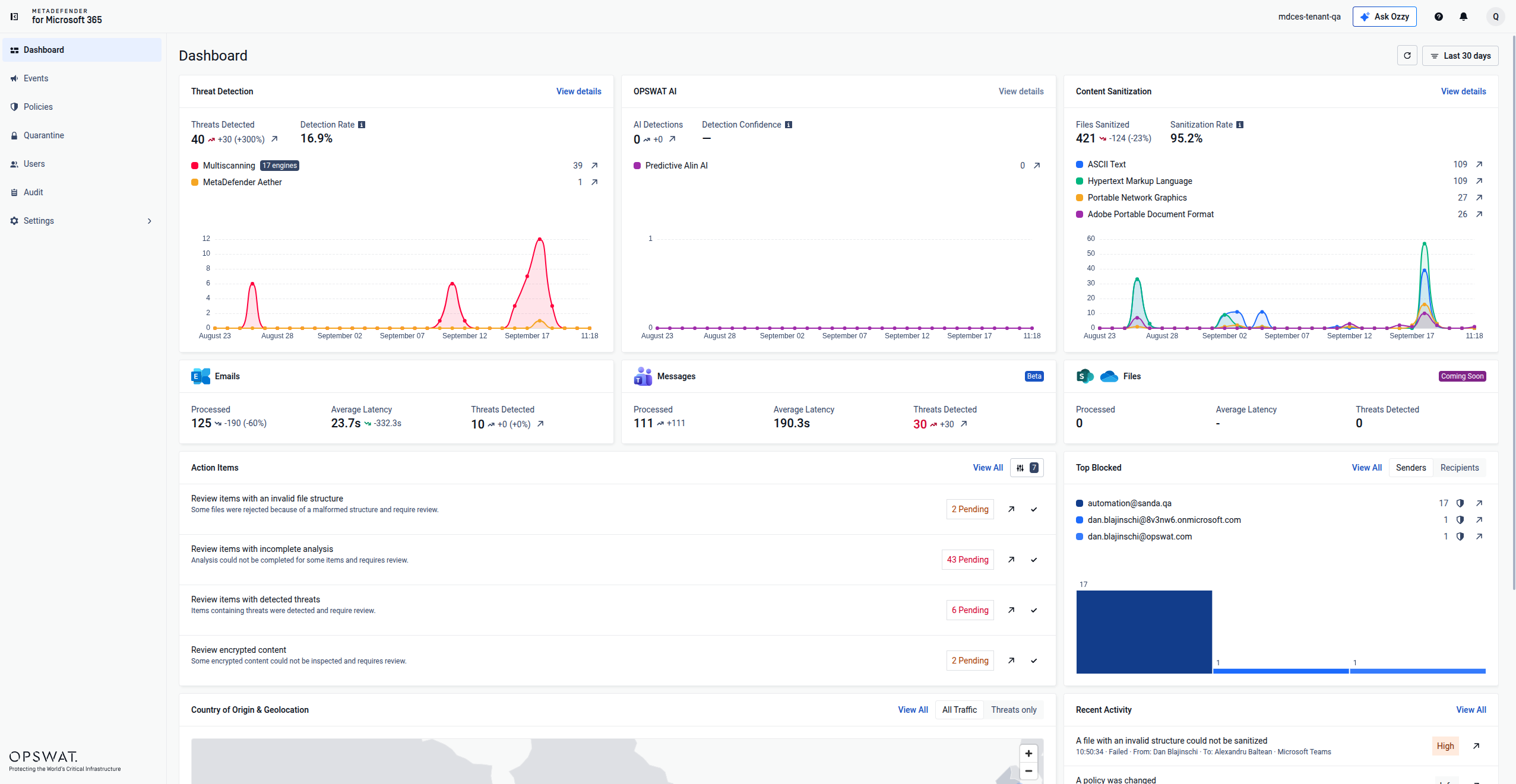
MetaDefender™ for Microsoft 365 is OPSWAT’s file threat prevention solution for inspecting and sanitizing files and emails across Exchange Online, and Teams, with SharePoint Online, and OneDrive protection to become available before the end of October 2026. With our inline email security, mails and attachments are analyzed and sanitized before delivery and blocked if deemed malicious.
- Multiscan every attachment. Metascan™ Multiscanning scans emails and files in parallel with up to 17 anti-malware engines, combining signature-based detection, heuristic analysis, and AI-powered models into one normalized verdict.
- Sanitize files with Deep CDR™ Technology. Rather than only flagging or blocking a file, content disarm and reconstruction rebuilds a file to remove active content. OPSWAT’s Deep CDR™ Technology preemptively removes potentially harmful content such as scripts, macros, embedded objects, QR-code URLs, and out-of-policy elements, then regenerates clean, usable files across 200+ file types.
- Analyze unknown or evasive files, including AI-generated files. MetaDefender Aether™ combines deep static inspection with instruction-level emulation to analyze evasive, multi-stage, and conditionally triggered threats. Its Adaptive Sandbox can analyze 50,000+ files or attachments per day per server, return fast-pass verdicts with threat intelligence in about 10 seconds, and map behaviors to MITRE ATT&CK for analyst-ready evidence.
- Add pre-execution prediction and threat intelligence. Predictive Alin AI delivers pre-execution malware verdicts by analyzing structural and behavior-linked file and email characteristics before signatures or sandbox detonation are required. Predictive Alin AI returns an average verdict in 6.67 milliseconds, with a 0.03% false-positive rate and 93% detection efficacy.
The same scrutiny is applied to password-protected files. When such a file is sent to either email or Teams, the recipient receives a notification to an online portal where they need to provide said password. Then, MetaDefender for Microsoft 365 uses it to inspect, sanitize and analyze it through the four technologies above mentioned, and delivers it safely and fully functional to the recipient, without admin validation, if no threat has been found.
How Does MetaDefender for Microsoft 365 Close the Gap at the Point of Entry?
Stopping a malicious attachment before it delivery means it never becomes a file sitting in a Teams channel’s SharePoint-backed storage in the first place. That timing matters, because a file inspected only after it lands in storage has already been available to anyone with access to that channel.
- Inspection happens before delivery, not after. A malicious attachment identified at the mail-flow layer can be addressed before it reaches the channel’s email address, which avoids the naming and traceability gaps that make after-the-fact detection harder.
- Coverage can follow mail flow beyond external inbound email. When the relevant Exchange Online routing and policy configuration sends messages through MetaDefender for Microsoft 365, suspicious attachments can be inspected before they reach users or collaboration spaces.
How Does This Fit into a Broader Microsoft Teams File-Security Strategy?
Email is only one of several entry points into Teams. A file a teammate uploads directly to a channel or shares in a chat does not follow the same Exchange Online path, so it also needs coverage at the storage layer where SharePoint and OneDrive hold Teams files. MetaDefender for Microsoft 365 scans, sanitizes and sandboxes files shared through Microsoft Teams upon delivery. For advanced storage specific coverage, MetaDefender Storage Security addresses both stored and shared files. MetaDefender Storage Security™ Cloud covers cloud storage such as SharePoint Online and OneDrive, including files shared through Microsoft Teams, while MetaDefender™ Storage Security covers on-premises repositories such as SharePoint Server, as well as SharePoint Online and OneDrive. Neither storage product covers Exchange Online, a channel protected by MetaDefender for Microsoft 365 only.
よくある質問(FAQ)
Does every Microsoft Teams channel really have its own email address?
Not automatically in every tenant. The channel email feature needs to be turned on by your IT admin, and sending email to a channel isn't available if you're using Teams as part of an Office 365 Government plan. When enabled, users can utilise the channel email address to send an email to the respective channel.
What happens to attachments sent to a Teams channel by email?
For sharing to channels, emails and attachments are copied to the Email messages folder in SharePoint. For email attachments, a unique ID is appended at the end of file name, and attachment file names, when viewed in the SharePoint library, are not guaranteed to match the attachment names in the original email.
Do Safe Attachments and Defender for Office 365 cover files that reach Teams through email?
Yes, built-in scanning and Defender for Office 365 Safe Attachments can apply, depending on licensing and configuration. Safe Attachments opens files in a virtual environment to see what happens and, when Safe Attachments for SharePoint, OneDrive, and Microsoft Teams identifies a malicious file, the file is locked using direct integration with the file stores. OPSWAT adds a different control objective with Deep CDR™ Technology, which disarms and regenerates supported files in milliseconds across 200+ file types with a 100% protection and accuracy score from SE Labs.
Does MetaDefender for Microsoft 365 also scan files uploaded directly to Teams chats and channels?
Yes, MetaDefender for Microsoft 365 inspects and sanitizes files shared through Teams chat and channels upon delivery. At the Exchange Online layer, emails and attachments are inspected, sanitized and detonated inline without MX record changes, before they reach recipients.