- 主なポイント
- How Malware Scanning Works Without Changing Microsoft 365 MX Records
- How API-Based, Connector-Integrated, and Gateway Email Security Compare
- Which Attachment Security Controls Strengthen Microsoft 365 Malware Prevention
- How MetaDefender for Microsoft 365 Adds File Threat Prevention Without MX Changes
- How to Deploy Tenant-Connected Malware Scanning with a Low-Risk Pilot
- How to Handle Complex and Password-Protected Email Attachments
- How Third-Party Attachment Security Works with Microsoft Defender for Office 365
- What to Evaluate Before Choosing Microsoft 365 Attachment Security
- よくある質問(FAQ)
主なポイント
- MX records control where mail arrives, not how attachments get inspected. Tenant-connected scanning adds a separate inspection layer without redirecting mail through a new public destination.
- API-based, connector, gateway, and journaling architectures each differ in enforcement timing, failure domain, and rollback profile, and those differences matter more than the label.
- Enforcement timing is the real question. Find out whether a product holds a message until a verdict arrives or remediates after the user may have already accessed it.
- A phased pilot validates the architecture before tenant-wide rollout. Least-privilege permissions, a representative pilot group, latency measurement, and a documented rollback plan come before full enforcement.
- MetaDefender™ for Microsoft 365 adds prevention-first, file-in-depth protection without MX changes or hardware. It combines inline inspection for Exchange Online email with API-based inspection for supported Teams workflows, with SharePoint Online, and OneDrive planned to roll out in October 2026, helping reduce the exposure window and reliance on post-delivery remediation.
How Malware Scanning Works Without Changing Microsoft 365 MX Records
A Mail Exchange (MX) record tells external mail servers where to deliver email for a domain, but it does not determine how attachments are inspected once messages enter Microsoft 365. Organizations can therefore add inline inspection through Exchange Online connectors without changing the public mail destination, while API-based workflows inspect files uploaded to Teams, SharePoint Online, and OneDrive.
Because attachment inspection, policy enforcement, quarantine, and remediation operate within the tenant, organizations can introduce an additional security layer while Exchange Online remains the public mail destination. Microsoft Learn explains how connectors can create this controlled message-processing path within the existing mail flow.
- What stays unchanged: external senders continue delivering email to the existing MX destination, and accepted messages continue through established Exchange Online routing, transport rules, and connectors.
- How the integration connects: Exchange Online email can be inspected through connector-based inline processing, while Teams, SharePoint Online, and OneDrive use API-based workflows with tenant authorization, defined policy scope, and administrative logging.
- Where inspection occurs: inline email inspection can hold an attachment until a verdict is available, whereas API-based workflows inspect Teams, SharePoint Online, and OneDrive files after upload. For collaboration workloads, verify whether access is restricted while analysis is in progress.
How API-Based, Connector-Integrated, and Gateway Email Security Compare
Deployment models differ in how they affect mail routing, when they can enforce a verdict, how they behave during service disruption, and how easily they can be rolled back. Those operational characteristics should drive the buying decision.
| 建築 | Routing Impact | Enforcement Timing |
| API-based scanning | Connects to Microsoft 365 without becoming the internet-facing mail gateway or requiring a new MX destination | Typically post-delivery or post-upload; remediation timing and access controls vary by product and workload |
| Connector-integrated inspection | Creates a controlled message-processing path while Microsoft 365 stays the public destination | Depends on connector direction, scope, and behavior when the inspection service is unavailable |
| Journaling | Creates a copy for retention or analysis, without changing the primary delivery path | Typically after the fact; often not an enforcement point before user access |
| Secure email gateway | Sits in front of Microsoft 365 and becomes part of the external mail path, requiring an MX change | Pre-delivery, but with added routing, availability, and troubleshooting dependencies |
Evaluate each option against observed enforcement behavior, ownership of the mail path, the period of potential user exposure, and the effort required to restore normal operations.
Which Attachment Security Controls Strengthen Microsoft 365 Malware Prevention
Safe Attachments detonates email attachments in a virtual environment before delivery. For SharePoint Online, OneDrive, and Teams, however, Microsoft’s built-in virus detection runs asynchronously after upload and uses heuristics to determine which files are scanned.
Multi-engine scanning, file sanitization, predictive analysis, and deeper file analysis address different stages of the file-threat lifecycle and can add inspection depth alongside Microsoft Defender for Office 365.
For collaboration workloads, the evaluation should establish when inspection begins, whether access is restricted while a verdict is pending, and whether the service covers content already stored in the tenant. Actual coverage will also depend on rollout scope, service availability, file-processing limits, and policy configuration.
How MetaDefender for Microsoft 365 Adds File Threat Prevention Without MX Changes
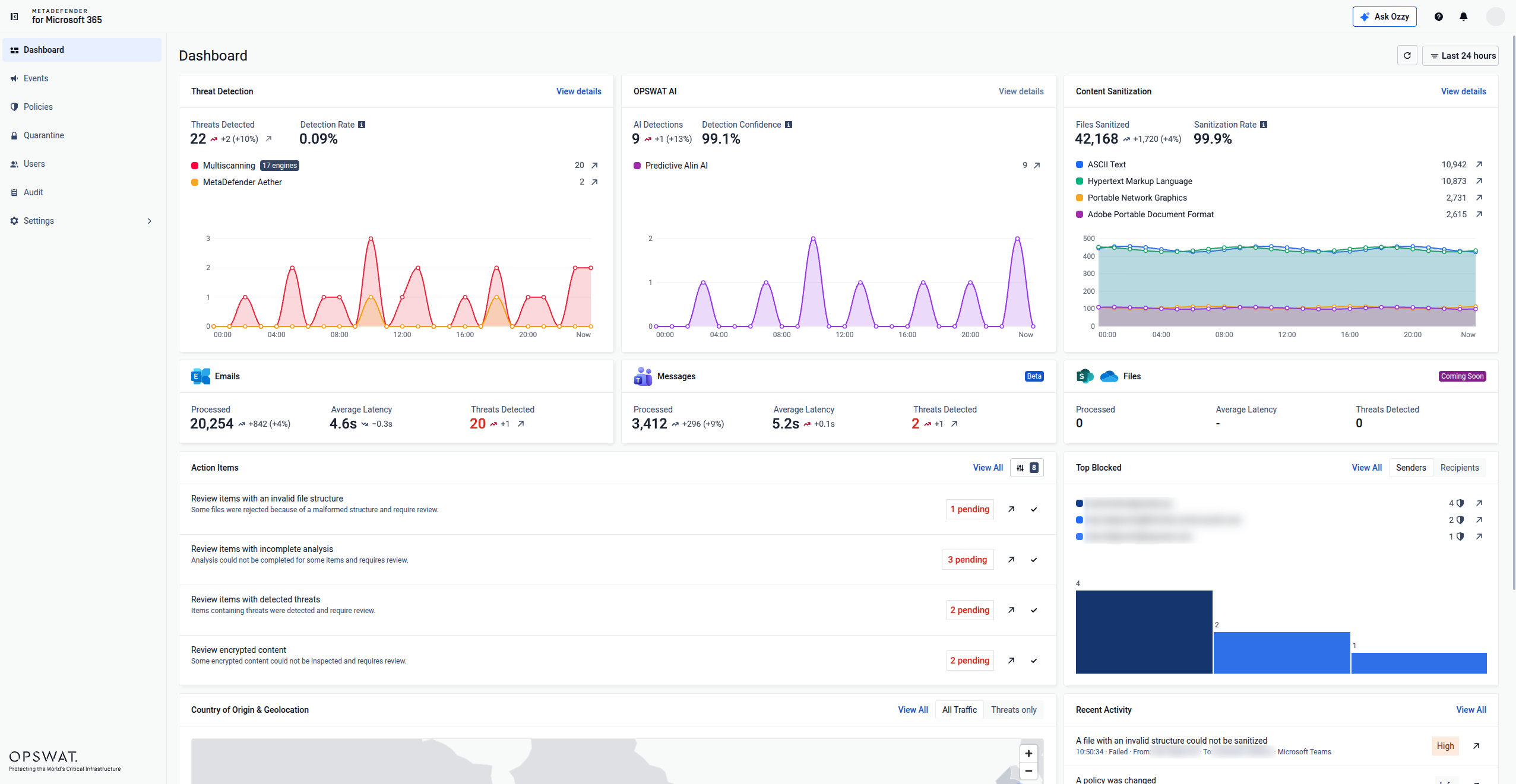
MetaDefender for Microsoft 365 is OPSWAT’s file threat prevention solution for supported Exchange Online, and Teams workflows, with SharePoint Online and OneDrive rolling out before the end of October 2026. It scans, sanitizes, and detonates emails and files moving through Microsoft 365 and protects organizations from known, unknown, and AI-generated threats.
| テクノロジー | 機能の説明 |
| Multiscanning | 最大17種類のマルウェア対策エンジンを並行して稼働させ、メールやファイルをスキャンすることで、検出の抜けを補います。 |
| Deep CDR™ | Provides prevention-first CDR security across 200+ file types by treating every file or attachment as potentially harmful, preemptively removing active content such as scripts, macros, embedded objects, QR-code risks, and out-of-policy elements, then delivering a clean, usable version. |
| MetaDefender | エミュレーションベースの動的マルウェア分析を活用し、境界線でゼロデイ攻撃、検知回避型、および多段階型の脅威を検知します。同社の「Adaptive 」(Sandbox )は、サーバー1台あたり1日50,000件以上のファイルや添付ファイルを分析し、約10秒で脅威インテリジェンスに基づく迅速な判定結果を返し、その挙動をMITRE ATT&CKにマッピングすることで、アナリストがすぐに活用できる証拠を提供します。 |
| 予測型アリンAI | シグネチャやサンドボックスでの実行を必要とせずに、ファイルや電子メールの構造的および動作に関連する特性を分析することで、実行前のマルウェア判定を行います。予測型AI「Alin AI」は、平均6.67ミリ秒で判定結果を返し、誤検知率は0.03%、検出精度は93%です。 |

"No email security control eliminates every threat, but a defensible strategy is to maximize coverage by combining detection with prevention-oriented controls."
Design the proof of concept around representative users, business-critical file types, and password-protected attachments, with success criteria for detection efficacy, routing behavior, processing latency, and rollback established before tenant-wide deployment.
How to Deploy Tenant-Connected Malware Scanning with a Low-Risk Pilot
- Confirm prerequisites and permissions: review accepted domains, connectors, transport rules, Defender policies, and requested application permissions, then restrict access according to least-privilege principles.
- Define a representative pilot group: select a limited group covering relevant attachment types, business workflows, and risk levels, with documented duration, stakeholders, and exit criteria.
- Configure attachment policies before enforcement: define handling for file types, archives, macros, encrypted content, and size limits, beginning in monitoring mode or with narrowly scoped enforcement before tightening controls.
- Test detection and sanitization safely: use approved benign test files and representative business documents to verify the full sequence from inspection through policy action, notification, and logging.
- Measure attachment-processing latency: capture baseline and pilot delivery times by file type and size, define acceptable latency thresholds, and track help-desk contacts and false positives.
- Plan failure behavior and rollback: define fail-open or fail-closed behavior for each policy and document the steps required to disable enforcement, revoke authorization, and confirm that normal mail flow has been restored.
How to Handle Complex and Password-Protected Email Attachments
- Archives and nested content: recursive inspection, archive depth, and decompression limits matter, and unscannable content shouldn't receive an implicit clean verdict when a processing limit is reached.
- Macros, scripts, and embedded objects: organizations can block, strip, sanitize, quarantine, or allow content based on sender trust and business need, distinguishing detection from proactively removing risky components.
- Password-protected attachments: because encrypted content cannot be inspected or sanitized without the password, MetaDefender for Microsoft 365 allows an authorized user to submit it securely. The decrypted file can then pass through inspection, sanitization and, when required, detonation before delivery, without routine administrator intervention.
- Clear notifications and exceptions: define what users see for delayed, blocked, quarantined, or password-protected attachments, backed by an auditable exception process with ownership and expiration.
- Reducing false positives: track recurring file types and senders that generate avoidable investigations, and use policy tuning and self-service password submission to eliminate repetitive manual triage.
How Third-Party Attachment Security Works with Microsoft Defender for Office 365
Third-party file inspection can operate alongside Microsoft Defender for Office 365 effectively when policy ownership is explicit, control boundaries are understood, and both systems are configured to avoid conflicting actions.
- Complementary controls: Microsoft continues to provide protection across email, identity, URLs, reputation signals, and Safe Attachments, while multiscanning, sanitization, and advanced file analysis add depth at the file-content layer.
- Clear scope boundaries: this added layer strengthens file inspection and sanitization, while Microsoft 365 controls continue to cover phishing, BEC, URL protection, identity, endpoint, and broader XDR functions.
- Avoiding conflicting actions: define which system owns blocking, quarantine, sanitized delivery, and release approval, and test messages that trigger both controls to catch loops or duplicate alerts.
- Duplicate scanning vs. defense in depth: before removing an overlapping control, confirm whether it brings an engine set, analysis method, or audit function that the remaining control lacks.
- A unified investigation process: correlate message identifiers, attachment hashes, and inspection results in one console or SIEM workflow so analysts aren't triaging the same incident twice.
What to Evaluate Before Choosing Microsoft 365 Attachment Security
| Criterion | What to Require |
| Pre-delivery vs. post-delivery | A precise explanation of when a message becomes accessible to users, and what happens if a malicious verdict arrives post exposure |
| File type & nested format coverage | Documented outcomes for archives, nested objects, macros, malformed files, and password-protected attachments |
| Data, privacy & residency | Where attachments and metadata are processed, stored, and logged, including retention and regional residency |
| Availability & failure modes | Service-level commitments, retry behavior, and documented fail-open/fail-closed options for different policies |
| Reporting & audit evidence | Searchable verdicts, file hashes, policy decisions, and SIEM/ticketing integration |
| Coverage beyond Exchange Online | Whether the same controls extend to Teams, SharePoint Online, and OneDrive, or stop at email |
Related Topics
Request a MetaDefender for Microsoft 365 demonstration to see inline inspection, sanitization, and reporting in action.
よくある質問(FAQ)
We already have Microsoft Defender. How is MetaDefender for Microsoft 365 different?
Microsoft’s built-in defenses provide a great baseline protection, but detection is not prevention. Microsoft’s email security benchmark found that Defender missed 221 high-severity threats per 1,000 protected users from May through July 2026. The results reinforce a core defense-in-depth principle: strong native controls can be complemented with deeper file inspection and sanitization to help reduce residual exposure.
What deployment architectures support inline email malware blocking in Microsoft 365 without changing MX records?
Connector-integrated inspection can block malicious email attachments before delivery without changing the public MX destination. APIs support collaboration workloads such as Teams, SharePoint Online, and OneDrive, where files are inspected after upload.
How do API-based scanning, connectors, and journaling compare for detection coverage and remediation speed?
Connector-integrated inspection can hold or block email before delivery, whereas API-based scanning begins after content reaches the relevant collaboration workload. Journaling creates a separate copy for retention or analysis and is therefore generally unsuitable as a control point for preventing user access.
Can third-party malware scanning work alongside Microsoft Defender for Office 365 without conflicting policies?
Yes, when policy ownership is explicit. Define which system owns blocking, quarantine, and release decisions, and test messages that trigger both controls to catch duplicate alerts or quarantine conflicts before full rollout.
Can email attachments be multiscanned and sanitized before users access them in Microsoft 365?
Yes. When inspection is inline, multiscanning can evaluate an email attachment with multiple anti-malware engines before delivery, while Content Disarm and Reconstruction (CDR) automatically removes potentially active content and rebuilds a usable version of the file. In Teams, SharePoint Online, and OneDrive, API-based inspection begins after the file is uploaded.
How do I test and verify that inbound email attachments are being scanned without disrupting mail flow?
Run a limited pilot with a representative group, approved test files, and monitoring-only or narrowly scoped enforcement first. Measure delivery latency against a baseline and confirm rollback steps work before expanding to the full tenant.