- 主なポイント
- Is Microsoft Defender for Office 365 Enough for Your Organization?
- What Does Microsoft Defender for Office 365 Protect?
- How Do Microsoft 365 Security Plans Change Your Protection?
- What Are the Safe Attachments Limitations and Residual File-Borne Risks?
- How Does File Sanitization Differ from Detection and Blocking?
- Which Additional Microsoft 365 File Security Controls Should You Evaluate?
- How Should You Compare Microsoft 365 File Security Options?
- How MetaDefender for Microsoft 365 Extends Native Protection
- Which Microsoft 365 File Protection Strategy Fits Your Risk Level?
- よくある質問 (FAQ)
主なポイント
- Threat volume makes residual exposure a board-level concern. Microsoft reports processing 100 trillion security signals every day; attackers only need one successful file, link, or credential path to create business impact.
- Sufficiency is a risk decision, not a universal verdict. Whether Defender for Office 365 is enough for your organization depends on license tier, configuration maturity, collaboration footprint, and the consequences of a successful file-borne attack.
- Coverage varies by plan. Exchange Online Protection, Plan 1, and Plan 2 layer in progressively more prevention, investigation, and automation capability, and owning a plan does not guarantee every policy is tuned correctly.
- Residual risk concentrates in specific file conditions. Password-protected files, nested archives, malformed documents, and evasive zero-day threats are more likely to slip past native detection.
- Detection and blocking differ from file sanitization. Content Disarm and Reconstruction (CDR) removes risky components and reconstructs a usable file instead of only allowing or blocking it outright.
- A layered approach can reduce residual exposure without disrupting mail flow. MetaDefender™ for Microsoft 365 adds multiscanning, Deep CDR™ Technology, fast-pass emulation-based sandboxing, and AI-powered pre-execution malware detection to the Microsoft 365 tenant without MX record changes or new hardware.
Is Microsoft Defender for Office 365 Enough for Your Organization?
Microsoft Defender for Office 365 is Microsoft's primary email and collaboration security solution for Microsoft 365, providing anti-phishing, anti-malware, Safe Links, and Safe Attachments protection across Exchange Online, Teams, SharePoint Online, and OneDrive. Coverage depth depends on license tier, policy configuration, and file type, leaving residual exposure to zero-day and evasive file-borne threats for some organizations.
Microsoft 365 is where business communication, collaboration, and file exchange converge, which makes it a high-value attack surface for hackers. Microsoft reports:
- screening 5 billion emails daily on average to protect users from malware and phishing,
- blocking 4.5 million net-new malware files every day,
- and processing 100 trillion security signals every day.
For security leaders, the question is whether native controls provide enough validated file protection for the way their organization actually exchanges files across email, Teams, SharePoint Online, and OneDrive. In practice, whether Microsoft Defender for Office 365 is enough depends on your risk tolerance, license tier, and the type of files moving through your tenant every day. Native protection gives Microsoft 365 customers a strong security baseline, but a baseline is not the same as a complete file-trust strategy across email and collaboration workflows. Residual risk can arise when a file cannot be fully inspected, when malicious behavior is not identified during initial analysis, or when a threat is discovered only after users may already have access to it.
Factors that should drive the decision:
- License and configuration maturity: whether Plan 1 or Plan 2 features are enabled, tuned, and validated.
- Collaboration footprint: how much file activity happens in Microsoft Teams, SharePoint Online, and OneDrive versus email alone.
- File complexity: exposure to password-protected files, nested archives, and unusual document structures.
- Compliance requirements: whether regulators expect documented, auditable file-handling evidence.
- Consequence of a miss: what a successful file-borne attack would cost your organization operationally and financially.
When Native Protection May Be Sufficient
Organizations with standard risk profiles, mature Microsoft security administration, well-tuned policies, and limited high-risk file exchange often get adequate protection from a properly configured Defender for Office 365 deployment. Sufficiency here assumes validated configuration, active investigation and response processes, on top of the enabled license.
When Native Protection May Need an Additional Layer
Elevated-risk conditions change the sufficiency assessment: regulated data, critical operations, high-value intellectual property, frequent external file exchange, and low tolerance for post-delivery exposure. Organizations in these conditions often need deeper file inspection, proactive sanitization, and more detailed audit evidence than native controls alone provide.
What Does Microsoft Defender for Office 365 Protect?
Microsoft Defender for Office 365 protects email, links, attachments, and supported collaboration workflows, while also providing anti-impersonation and compromised-user signals in applicable plans. Availability and behavior for each capability depend on licensing, workload support, and policy configuration, so validate these areas individually instead of assuming they operate as a single package.
- Safe Attachments: evaluates supported files using detonation and verdict-based handling such as blocking, monitoring, or dynamic delivery.
- Safe Links: time-of-click URL evaluation and link rewriting, which is separate from attachment or file-content inspection.
- Anti-phishing and impersonation protection: spoof intelligence, mailbox intelligence, and impersonation detection for social engineering and business email compromise (BEC) scenarios.
- Investigation and response: alerting, automated investigation and response, and threat hunting, with depth that varies by plan and available SOC staffing.
- Teams, SharePoint Online, and OneDrive coverage: Microsoft protects supported files across these workloads, but exact behavior varies by license, policy, and file state. Teams files are commonly stored in SharePoint Online or OneDrive, so administrators should validate the actual storage path and policy scope instead of assuming Teams has separate, uniform coverage.
How Do Microsoft 365 Security Plans Change Your Protection?
Exchange Online Protection, Microsoft Defender for Office 365 Plan 1, and Plan 2 represent distinct security baselines rather than incremental settings within a single product. Always verify current feature and licensing details against Microsoft documentation, since packaging and prerequisites can change.
| Plan | What It Provides |
| Exchange Online Protection | Baseline anti-malware, anti-spam, anti-phishing, spoof protection, and mail-flow and quarantine controls |
| Defender for Office 365 Plan 1 | Adds Safe Attachments, Safe Links, real-time detections, and advanced anti-phishing capabilities such as user and domain impersonation protection on top of the built-in security features for all cloud mailboxes |
| Defender for Office 365 Plan 2 | Adds threat investigation and hunting, campaign analysis, Automated Investigation and Response, and Attack Simulation Training on top of Plan 1 |
Owning a plan does not guarantee uniform protection. Map assigned licenses, enabled policies, protected recipients, and workload settings against your actual environment through configuration review and controlled testing. Bundled security still needs proof that the right protections are active where they matter.
What Are the Safe Attachments Limitations and Residual File-Borne Risks?
Residual risk after deploying Safe Attachments concentrates in a specific set of file conditions and delivery-timing gaps.
- Unknown and zero-day malware: sandboxing, reputation, and machine learning identify many unknown threats, but no detection system guarantees catching every previously unseen file, and evasive malware can delay or avoid a definitive verdict.
- Weaponized and malformed documents: active content, macros, embedded objects, and deliberately malformed file structures complicate analysis, creating a different challenge that consists in removing unnecessary file components before users interact with the file.
- Nested files and complex archives: archives within archives, embedded documents, and oversized or unusual structures can exceed inspection depth or processing limits.
- Password-protected and encrypted files: standard security tools cannot fully inspect encrypted content without the password, forcing a choice between blocking, quarantining, manual review, or a secure password-submission workflow.
- The post-delivery exposure window: retroactive detection and automated remediation reduce dwell time but differ from preventing access to risky content before delivery.
- Configuration gaps: policy scope, exceptions, trusted-sender rules, and inconsistent settings across users or domains often explain more residual risk than the underlying detection technology.

“Detection-based email security works excellent against known threats. But on its own, it's no longer enough for the threat patterns Microsoft documented in Q1 2026.”
How Does File Sanitization Differ from Detection and Blocking?
What Detection and Blocking Do After a Malicious Verdict
Verdict-based controls classify content and then allow, delay, quarantine, replace, or block it according to policy. This approach involves tradeoffs between false positives, delayed verdicts, user access, and business interruption, since every action depends on reaching a confident verdict first.
What Content Disarm and Reconstruction Does to a File
Content Disarm and Reconstruction deconstructs a supported file, removes or neutralizes potentially risky components as dictated by the setup policy, and reconstructs usable content. This reduces reliance on identifying a specific malware family, without implying that every threat will be prevented. Sanitizing is often more practical than blocking for invoices, contracts, and partner-submitted documents that users still need to access. Security, legal, or compliance teams may still require controlled retention of original files for chain-of-custody and audit purposes.
Which Additional Microsoft 365 File Security Controls Should You Evaluate?
Vendor-neutral evaluation should prioritize measurable inspection depth, prevention outcomes, tenant coverage, auditability, and operational impact over feature-count comparisons.
- Multi-engine malware scanning: broadens known-threat coverage beyond one engine's signatures and heuristics. Ask vendors for engine count, update frequency, and false-positive handling.
- Predictive AI and deeper evasive-threat analysis: machine learning and behavioral analysis for suspicious or evasive files, with visibility into supported formats and processing time.
- Deep CDR™ Technology: deconstructs, sanitizes, and reconstructs files across the formats your organization actually uses, while aiming to preserve business functionality.
- Consistent cross-workload policy: one policy model across Exchange Online, Teams, SharePoint Online, and OneDrive instead of fragmented, workload-specific controls.
- Password-protected file workflows: secure self-service password submission so authorized content gets inspected and sanitized fast without routine administrator intervention.
- Audit and compliance evidence: time-stamped records for file receipt, verdicts, and sanitization actions, with SIEM integration and data-residency support.
For a closer look at how these layers work together in practice, explore OPSWAT Academy Pulse.
How Should You Compare Microsoft 365 File Security Options?
Use representative-file testing and measurable success criteria to compare Microsoft 365 file security options. Buyers should validate how each control handles the files their users exchange, including password-protected files, nested archives, malformed documents, large files, and files shared through collaboration workflows.
| Evaluation Criteria | What to Check |
| Detection and false positives | Test against representative business files and ask for evidence beyond vendor claims |
| Processing latency | Measure high-percentile latency by file type and size, including outliers that averages can obscure |
| Email-only vs. tenant-wide | Confirm whether protection extends to Teams, SharePoint Online, and OneDrive or email only |
| Deployment model | Confirm whether the option requires MX record changes, new hardware, or mail rerouting |
| Compliance fit | Validate policy enforcement, auditability, and data residency against your specific regulatory framework |
How MetaDefender for Microsoft 365 Extends Native Protection
Before adding another security layer, buyers should pressure-test three questions:
- Where do files enter the organization?
- When are users allowed to access them?
- What evidence proves the file was inspected or sanitized?
If those answers differ across Microsoft email, Teams, SharePoint Online, and OneDrive, the organization may have a file-trust gap.
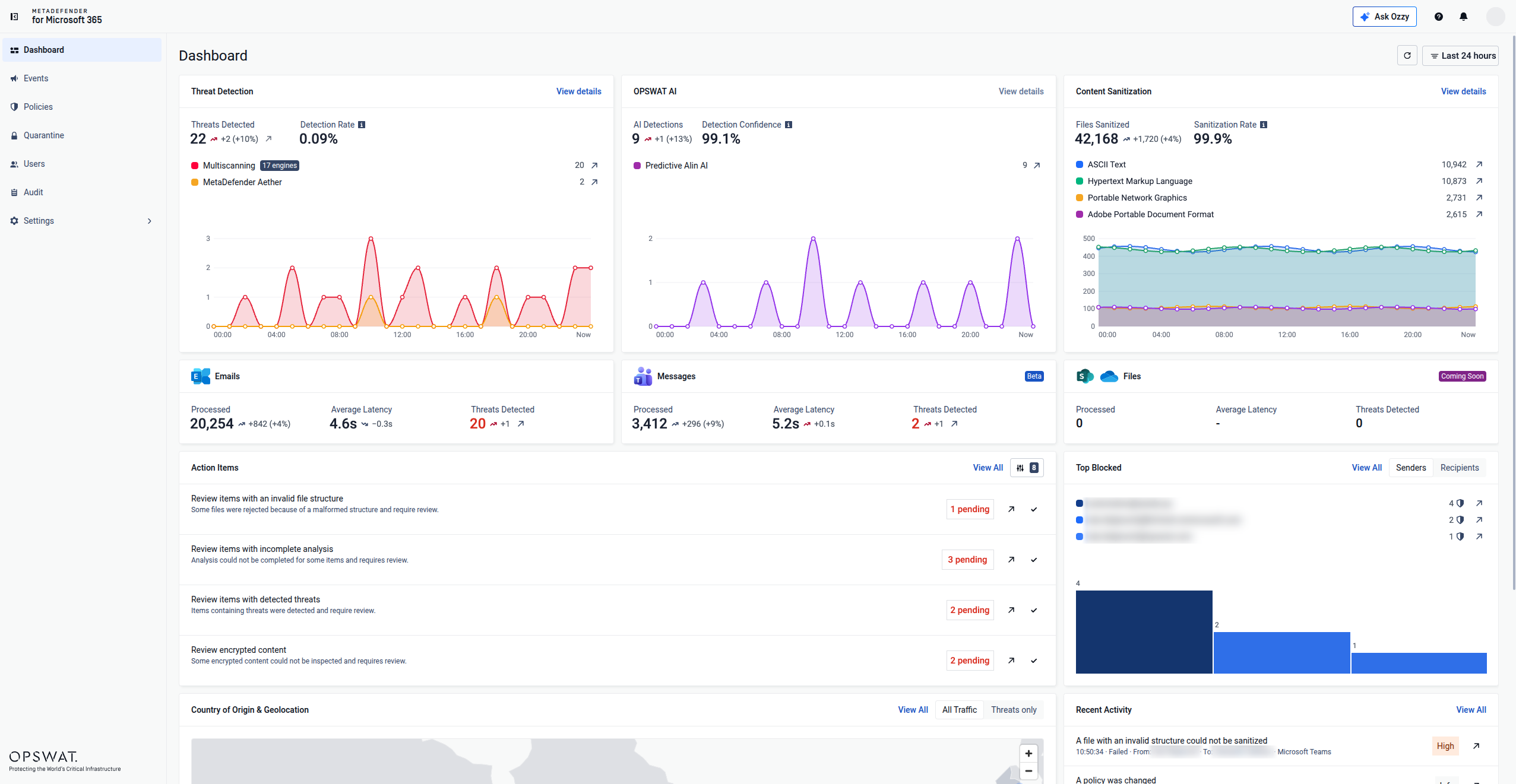
MetaDefender™ for Microsoft 365 is OPSWAT's file threat prevention solution for inspecting and sanitizing files across Exchange Online and Teams, with SharePoint Online and OneDrive coverage planned to roll out mid-October 2026. It is introduced here as a prevention-first layer that complements Microsoft's native baseline by adding deeper file inspection, sanitization, and audit evidence where organizations need stronger control over files entering collaboration workflows.
- Microsoft 365 tenant-wide coverage: applies consistent file inspection and sanitization across Exchange Online, and Teams, with SharePoint Online, and OneDrive coverage rolling out mid-October 2026, instead of limiting protection to the inbox.
- Metascan™ Multiscanning: scans files in parallel with up to 17 anti-malware engines, combining signature-based detection, heuristic analysis, and AI-powered models into one normalized verdict.
- Deep CDR™ Technology: treats files as untrusted, verifies file type and structure, removes potentially risky active content such as scripts, macros, embedded objects, and out-of-policy elements, then regenerates clean, usable content across 200+ file types.
- Predictive Alin AI and MetaDefender Aether™: Predictive Alin AI delivers AI-powered pre-execution malware verdicts in milliseconds based on file structure and behavior-linked indicators, while MetaDefender Aether provides deeper emulation-based analysis for evasive, zero-day, and multi-stage threats.
- Self-service password-protected file processing: recipients securely supply a password so MetaDefender for Microsoft can automatically scan, sanitize, and sandbox the file. If no threat has been detected, the recipient receives a functional file, without routine administrator validation.
- No MX record changes, no hardware: adds in-depth file threat prevention to the Microsoft 365 tenant without mail rerouting, new hardware, or unnecessary mail-flow disruption.
Which Microsoft 365 File Protection Strategy Fits Your Risk Level?
| Risk Tier | Recommended Action |
| Standard risk | Confirm licenses, apply Microsoft baseline policies, reduce exclusions, test Safe Attachments and Safe Links, and assign clear response ownership |
| Elevated risk | Add broader collaboration coverage, multi-engine scanning, proactive sanitization, and stronger password-protected file handling |
| Regulated | Require policy-based inspection, chain-of-custody evidence, and compliance-aligned reporting before deployment |
| Critical infrastructure | Prioritize prevention-first handling, strict policy enforcement, and detailed evidence for files entering sensitive workflows |
A practical Microsoft 365 file protection assessment moves through license discovery, policy review, workload mapping, and representative-file testing before deciding whether native controls are sufficient or an additional layer is warranted. Organizations should test the archive depths, embedded objects, document formats, and file sizes they exchange most often to understand how each control behaves under real-world file conditions.
Related Topics
- 5つのコンプライアンス・フレームワークがどのように再定義しているかEmail Security
- 7つの質問でEmail Security 評価する方法
- SVGを介して配信されるマルウェアがメールを溢れさせている。実際にこれを阻止する方法とは。
MetaDefender for Microsoft 365 adds prevention-first file inspection and sanitization to your existing Microsoft 365 environment, layering multiscanning, Deep CDR™ Technology, and AI-driven analysis on top of native Defender coverage. With this approach, security teams can reduce residual file risk across email and collaboration workflows without MX record changes or new hardware.
Get started with OPSWAT to evaluate MetaDefender for Microsoft 365 for your environment.
よくある質問 (FAQ)
Is Microsoft Defender for Office 365 enough to stop advanced phishing, zero-day malware, ransomware, and business email compromise?
It depends on license tier, configuration maturity, and your risk tolerance. Defender for Office 365 provides a strong native baseline, but zero-day malware, evasive threats, and certain file conditions can still create residual risk that some organizations choose to address with an additional inspection and sanitization layer.
What are the security and licensing differences between Exchange Online Protection, Defender for Office 365 Plan 1, and Plan 2?
Exchange Online Protection provides baseline anti-malware, anti-spam, anti-phishing, spoof protection, and mail-flow and quarantine controls. Defender for Office 365 Plan 1 adds Safe Attachments, Safe Links, real-time detections, and advanced anti-phishing capabilities such as user and domain impersonation protection. Plan 2 adds threat investigation and hunting, campaign analysis, Automated Investigation and Response, and Attack Simulation Training on top of Plan 1.
Does Microsoft Defender for Office 365 scan files shared through Teams, SharePoint Online, and OneDrive?
Microsoft protects supported files across these workloads, but exact capabilities vary by license, policy, and file state. Because Teams files are commonly stored in SharePoint Online or OneDrive, administrators should validate where the file resides, which policy evaluates it, and whether inspection occurs before or after user access.
What file-borne threat protection gaps remain after deploying Microsoft Defender for Office 365?
The most common gaps involve password-protected and encrypted files, deeply nested archives, malformed or weaponized documents, and the exposure window before a zero-day threat receives a definitive verdict.
How can third-party email security complement Microsoft Defender for Office 365 without changing MX records?
With MetaDefender for Microsoft 365, email protection is enforced inline so files can be inspected before inbox delivery, and malicious content can be stopped before user exposure. Microsoft Teams protection uses API-based integration to inspect and sanitize files as they enter collaboration workflows.